🧰 Windows Server Containers: Your Guide to Modern App Deployment
🧬 Windows Server Containers: Lightweight Virtualization Explained
In the ever-evolving world of server hosting and application deployment, businesses are constantly seeking faster, more efficient, and scalable ways to run workloads. One such technology gaining traction, especially for Windows environments, is Windows Server Containers.
Whether you’re managing microservices or enterprise applications, containers offer a powerful alternative to traditional virtual machines (VMs) — and in this blog, we’ll explore exactly why.
📦 What Are Windows Server Containers?
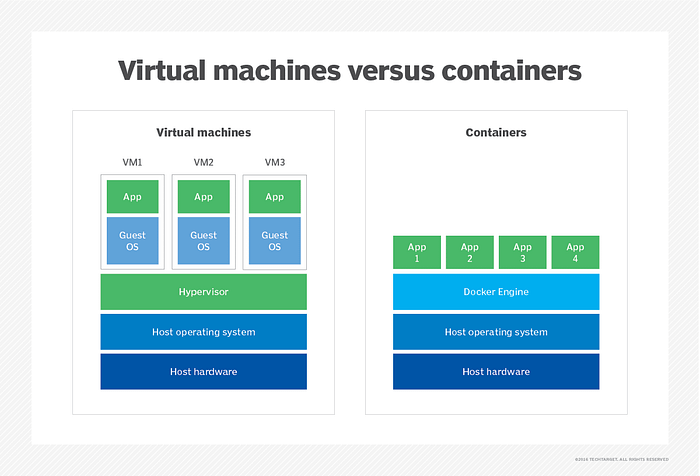
Windows Server Containers are a form of lightweight virtualization that allows you to run multiple isolated applications on the same host OS. Unlike VMs, containers don’t need a full guest operating system; instead, they share the kernel of the host OS, making them faster and more resource-efficient.
There are two main types of containers in Windows Server:
- Windows Server Containers: Share the kernel with the host and other containers.
- Hyper-V Containers: Run with isolation similar to VMs by using a minimal OS in a lightweight VM.
🔍 How Are Containers Different from VMs?
Feature Containers Virtual Machines Boot Time Seconds Minutes Resource Usage Low (share OS kernel) High (each runs a full OS) Isolation Process-level (shared kernel) OS-level (fully isolated) Portability Highly portable Less portable Use Case Microservices, fast deployments Full OS workloads, strict isolation
🛠️ Why Use Windows Server Containers?
Here’s why more businesses are integrating containers into their workflows:
1. Speed and Efficiency
Containers start almost instantly, enabling faster deployment and scaling. Perfect for CI/CD pipelines.
2. Resource Optimization
Containers are lightweight, meaning you can run many on a single server without the overhead of multiple OSes.
3. Portability
A containerized app runs consistently across different environments — dev, test, staging, and production.
4. Integration with Docker & Kubernetes
Windows Server supports Docker, allowing for modern container management, and integrates well with Kubernetes for orchestration.
5. Consistency Across Environments
No more “it works on my machine.” Containers help ensure the same environment follows your app from development to deployment.
🔐 Are Containers Secure?
While containers share the host OS, Windows Server Containers enforce isolation through namespaces and resource limits. For stronger isolation, Hyper-V Containers offer VM-like security boundaries.
For even better security and performance, VCCLHOSTING offers hardened Windows VPS solutions that support containerized environments.
🧪 Common Use Cases
- Hosting microservices
- Legacy app modernization
- Automated testing environments
- Lightweight web application hosting
- Development sandboxes
🖥️ Diagram: Containers vs. VMs
sql
CopyEdit
+----------------------------+       +-------------------------------+
|      Virtual Machines      |       |         Containers            |
+----------------------------+       +-------------------------------+
| App | App | App            |       | App | App | App               |
| OS  | OS  | OS             |       |     |     |                   |
| VM  | VM  | VM             |       |-------------------------------|
| Hypervisor                |       | Container Runtime (Docker)    |
| Host Operating System     |       | Host Operating System         |
| Hardware                  |       | Hardware                      |
+----------------------------+       +-------------------------------+
🌐 VCCLHOSTING: Your Container-Ready Windows VPS Partner
At VCCLHOSTING, we offer powerful Windows VPS solutions that are optimized for container hosting. Whether you’re deploying Docker containers or running enterprise apps in Hyper-V isolation, our servers deliver the performance, security, and flexibility you need.
➡️ Explore our Windows VPS plans and get started with containerized infrastructure today!
📌 Final Thoughts
Windows Server Containers are revolutionizing the way applications are built, tested, and deployed in Windows environments. They’re fast, lightweight, and ready for the modern cloud-native world.
Embrace containers and let VCCLHOSTING help you scale smarter.
Comments
Post a Comment